

Patient lookup from HPRS
HPRS provides beneficiary registry information used to validate the beneficiary attached to a clinical workflow. Integrate through the PDQm FHIR API or the PDQ-HPRS HL7 v2 interface.
For patient demographics integration, see:
Important links
- HL7 v2 general information: https://hl7-definition.caristix.com/v2/
- HL7 v2 ER7 segment definitions in detail: https://hl7-definition.caristix.com/v2/HL7v2.5.1/Segments
- HL7 v2 tables: https://hl7-definition.caristix.com/v2/HL7v2.5.1/Tables
- HL7 online parser: https://hl7messageparser.azurewebsites.net/Parse/ParseView
- HL7 online parser: https://www.hl7inspector.com/
- HL7 library (Node.js): https://www.npmjs.com/package/simple-hl7
- HL7 library (Python): https://pypi.org/project/hl7/
- HL7 library (C#): https://www.nuget.org/packages/nhapi
- HL7 library (Java): https://hapifhir.github.io/hapi-hl7v2/
Testing & Reference
HPRS currently supports HL7 v2 PDQ requests sent as the body of an HTTPS request: https://hapifhir.github.io/hapi-hl7v2/hapi-hl7overhttp/specification.html
- Download Postman in order to create HTTP requests to test against health interop: https://www.postman.com/downloads/
- Url for testing ITI-21 : https://test-hie.health.gov.za/pdq
- Url for testing ITI-78 : https://test-hie.health.gov.za/pdqm/Patient?identifier=
- Url for testing ITI-119 : https://test-hie.health.gov.za/pdqm/Patient/$match
- Url for testing mutual tls and security header : https://test-hie.health.gov.za/mtlspdqm/Patient
- Caristix link for quick explanation of HL7 standards and er7 strings: https://hl7-definition.caristix.com/v2/HL7v2.5.1/Segments, The main segments to look at are the QPD and the PID
- HL7 FHIR R4 Patient format: https://hl7.org/fhir/R4/patient.html
Contents
- Introduction
- Use cases
- Applicable IHE profiles
- Sequence diagrams
- Message structures
- Security and auditing requirements
- Minimum requirements for 3rd party applications
- Open issues and notes
Introduction
Background
The National Department of Health gazetted the Normative Health Standards Framework (HNSF) for eHealth in South Africa in April 2014. The gazette states that patient information systems in the South African health sector should comply with the standards described in the HNSF.
The HNSF describes IHE profiles and associated standards that should be followed when implementing specific eHealth functions. The relevant function in this specification is searching for and finding patient records. A key requirement for this function is correct management of patient identity and demographic information.
The National Health Insurance (NHI) white paper (December 2015) describes the Health Patient Registration System (HPRS) as the system providing Patient Registry and Master Patient Index services for public PHC facilities. HPRS is therefore the definitive source of patient identity and demographic information for the South African public health system.
Patient information systems operating in this environment are required to query HPRS through standards-based interfaces described in the HNSF to retrieve current patient identity and demographic information. The PRN assigned by HPRS should be stored and used in subsequent eHealth transactions.
HPRS architecture
HPRS connects health facility clients to HPRS Local Servers, which sync over the internet to the HPRS Central Server.
- National Health Data Centre: HPRS Central connects through a PDQ interface to online and central third-party systems.
- Health facility: HPRS Local connects through PDQ to offline third-party systems and syncs data between local and central.
HPRS user profiles and responsibilities
| Profile | Responsibility |
|---|---|
| Clerk Operator | Add and edit patients |
| Data Manager | Perform data management |
| Facility Account Curator | Create user accounts |
| Facility Account Activator | Activate user accounts |
| Facility Administrator | Manage features |
| Integration Manager | Manage integrations |
| Report Viewer | View patient and facility reports |
| Programme Officer | View facility and programme reports |
| Technician | View facility and technical reports |
| System Administrator | Manage system configuration data |
HPRS value and benefits
- Assists with identifying the population
- Enables the NDoH to plan and provision health care facilities and services
- Streamlines workflow within health facilities
- Reduces patient waiting times in health facilities
- Assists in tracking patients between health facilities
- Supports shared access to patient information
- Reduces duplicate patient records
Purpose of the document
This interoperability specification describes interaction and technical requirements for third-party patient information systems to query HPRS for patient identification and demographic information through a standards-based interface.
Intended audience
Suppliers of patient information systems developing new systems, or updating existing systems, to comply with the HNSF for patient search and retrieval workflows.
Relevant documents
- Health Normative Standards Framework for eHealth in South Africa (2014)
- National Health Insurance for South Africa white paper (2015)
- Relevant policies (TBD)
Use cases
UC_001 Find patient on HPRS
| Field | Description |
|---|---|
| Use case number | UC_001 |
| Use case name | Find patient on HPRS |
| Description | The HPRS front-end at the facility is used to register patients, verify identity, update details, and record visits. The 3rd party patient information system queries HPRS and displays returned demographics. Returned demographics and identity data are stored locally and the workflow continues in the 3rd party system. |
| Applicable IHE profiles and messages | PDQ ITI-21 Patient Demographics Query |
Actors
- Admin clerk: Reception staff responsible for registering the patient or capturing further details in a 3rd party patient information system.
- Patient: The person presenting at the healthcare facility.
- HPRS: The definitive source of patient identity and demographic information.
- Patient information system: A 3rd party system compliant with HNSF standards for managing patient records.
Pre-conditions
- The HPRS front-end is deployed at reception.
- The 3rd party patient system is compliant with the IHE PDQ profile.
- Network connectivity exists between the 3rd party system and HPRS.
Post conditions
Patient demographic and identity information is successfully retrieved from HPRS and stored in the 3rd party patient management system.
Main success scenario
- Patient presents at reception.
- Patient is processed in HPRS and visit information is recorded.
- The patient information system is launched after HPRS processing and receives the PRN.
- The patient information system submits a PDQ query with the PRN.
- HPRS returns patient demographics.
- The patient information system displays the returned demographics.
- The patient information system stores returned demographics in the local database.
- Processing continues in the patient information system.
Alternative courses
- 3a. Patient information system is not launched automatically
- The admin clerk opens the patient information system.
- The clerk enters demographic or identity details and searches for the patient.
- The system submits a PDQ query with captured details.
- Continue from step 5 in the main success scenario.
- 5a. HPRS returns more than one result
- The patient information system displays a candidate list.
- The admin clerk selects the correct patient.
- Continue from step 6 in the main success scenario.
- 5b. HPRS does not find the patient
- The patient is not registered in HPRS.
- Admin clerk registers the patient in HPRS.
- Continue from step 2 in the main success scenario.
Exceptions
- 5a. HPRS is not available
- The patient information system should attempt the PDQ query 3 times (to be confirmed).
- If HPRS remains unavailable, the clerk can create the patient in the local database.
- Processing continues in the patient information system.
Assumptions & dependencies
- None currently captured.
Applicable IHE profiles
Profiles
- [CT] Consistent Time: Synchronizes system clocks across the network with median error less than 1 second.
- [ATNA] Audit Trail and Node Authentication: Supports confidentiality, integrity, and accountability.
- [PDQ] Patient Demographics Query: Allows applications to query HPRS for demographic and visit information.
Services
- Q22 Find Candidates: Triggers HPRS to return patients matching demographic criteria.
- ZV1 Find Candidates from Visit Information: Triggers HPRS to return patients matching demographic and visit criteria.
Actors
ATNA actors:
- Applications: Create and transmit audit records.
- Audit Record Repository: Receives and stores audit records.
PDQ actors:
- Patient Demographics Consumer: Sends query requests.
- Patient Demographics Supplier (HPRS): Returns matching demographic and visit information.
Transactions
- ITI-19 Authenticate Node: Mutual node authentication.
- ITI-20 Record Audit Event: Audit event submission to audit repository.
- ITI-21 Patient Demographics Query: Query HPRS for demographics.
- ITI-22 Patient Demographics and Visit Query: Query HPRS for demographics and visit data.
Diagrams
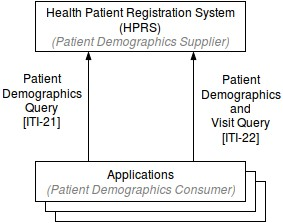
The diagram below shows HPRS as the Patient Demographics Supplier and client applications as Patient Demographics Consumers connected via ITI-21 and ITI-22.
Sequence diagrams
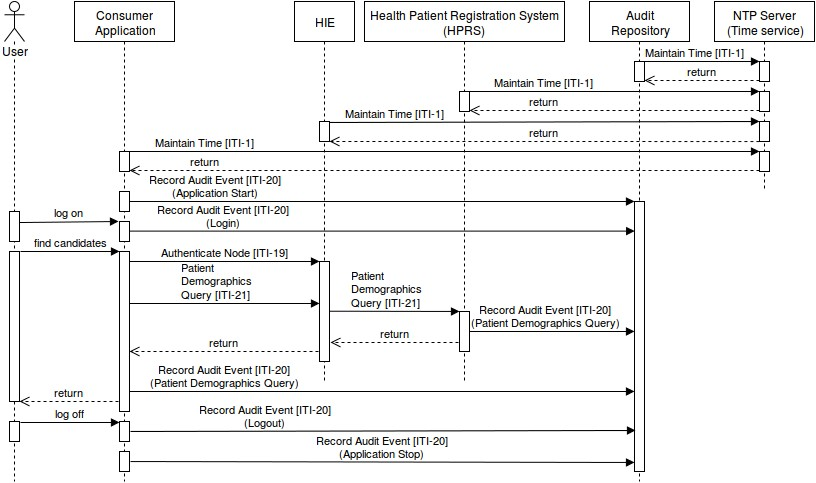
The following process flow describes message movement through NHIE and participating actors:
- Maintain Time [ITI-1] may occur at any time.
- A Consumer Application starts and submits an audit "Application Start" via Record Audit Event [ITI-20].
- A user logs on to the Consumer Application.
- The application submits an audit "Login" message.
- The user requests patient lookup from HPRS.
- Node authentication (Authenticate Node [ITI-19]) occurs between Consumer Application and NHIE.
- The Consumer Application sends Patient Demographics Query [ITI-21] and receives response from HPRS.
- The Consumer Application submits audit "Patient Demographics Query" via ITI-20.
- On user log-out, the Consumer Application submits an audit "Logout" message.
- Before shutdown, the Consumer Application submits an audit "Application Stop" message.
Message structures
Patient Demographics Query
Trigger events
When Applications need to list patients using known demographics, they use PDQ and the trigger event:
- Q22 Find Candidates
Message semantics
The Patient Demographics Query transaction uses the HL7 QBP^Q22 message.
| Segment | Element Name | Description |
|---|---|---|
| MSH | Message Header | Each message SHALL begin with MSH. |
| QPD | Query Parameter Definition | Consumer SHALL send query attributes in QPD. |
| RCP | Response Control Parameter | Consumer SHALL send response control attributes in RCP. |
| [DSC] | Continuation Pointer | MAY be used to request additional increments; SHOULD be omitted on initial query. |
Examples
- HL7
QBP^Q22message, query by parameter:@PID.5.1.1^SMITH~@PID.8^F
Patient Demographics Response
Trigger events
HPRS responds to Q22 using:
- K22 Find Candidates response
Message semantics
The Patient Demographics Response uses the HL7 RSP^K22 message.
| Segment | Element Name | Description |
|---|---|---|
| MSH | Message Header | Each message SHALL begin with MSH. |
| MSA | Message Acknowledgement | No extra attributes beyond HL7 standard are required. |
[{ERR}] | Error | Used to add error comments to acknowledgments. |
| QAK | Query Acknowledgement | Supplier SHALL send attributes in QAK. |
| QPD | Query Parameter Definition | Supplier SHALL echo the QPD from QBP^Q22. |
[PID | Patient Identification | One PID group per matching patient. |
| PD1 | Patient Additional Demographic | Optional additional demographics per patient. |
QRI] | Query Response Instance | Optional per returned patient. |
| [DSC] | Continuation Pointer | Used when returning incremental responses. |
Examples
RSP^K22response pattern.
Patient Demographics and Visit Query
Trigger events
For demographic plus visit criteria, Applications use:
- ZV1 Find Candidates from Visit Information
Message semantics
The transaction uses the HL7 QBP^ZV1 message.
| Segment | Element Name | Description |
|---|---|---|
| MSH | Message Header | Each message SHALL begin with MSH. |
| QPD | Query Parameter Definition | Consumer SHALL send query attributes in QPD. |
| RCP | Response Control Parameter | Consumer SHALL send response control attributes in RCP. |
| [DSC] | Continuation Pointer | MAY be used to request additional increments. |
Examples
- HL7
QBP^ZV1query by parameter:@PV1.3.2^389~@PV1.3.3^2
Patient Demographics and Visit Response
Trigger events
HPRS responds to ZV1 using:
- ZV2 Find Candidates with Visit Information response
Message semantics
The transaction uses the HL7 RSP^ZV2 message.
| Segment | Element Name | Description |
|---|---|---|
| MSH | Message Header | Each message SHALL begin with MSH. |
| MSA | Message Acknowledgement | No extra attributes beyond HL7 standard are required. |
[{ERR}] | Error | Used to add error comments to acknowledgments. |
| QAK | Query Acknowledgement | Supplier SHALL send attributes in QAK. |
| QPD | Query Parameter Definition | Supplier SHALL echo QPD from query. |
[{PID | Patient Identification | One PID group per matching patient. |
| [PD1] | Patient Additional Demographic | Optional additional demographics. |
| PV1 | Patient Visit | Visit-level details. |
| [PV2] | Patient Visit – Additional Information | Continuation of PV1 data. |
[QRI]}] | Query Response Instance | Optional per returned patient. |
| [DSC] | Continuation Pointer | Used for incremental response sets. |
Examples
RSP^ZV2response pattern.
Error handling
Examples
RSP^K22message error, response pattern, nothing found.
Security and auditing requirements
Atna
The Secure Node or Secure Application Actor creates the audit record and transmits it to the Audit Record Repository as soon as possible. If the Audit Record Repository is unavailable, audit records SHALL be buffered locally until connectivity is restored.
Trigger events
The following audit events SHALL be recorded:
- (ITI-20) Actor-start-stop: actor startup and shutdown.
- (ITI-20) User Authentication: successful/unsuccessful log-on and log-off.
- (ITI-20) Query Information: events for ITI-21 trigger events (
Q22,K22).
Examples
110120 (DCM)Application Start110122 (DCM)LoginITI-21 (IHE Transactions)Patient Demographics Query110123 (DCM)Logout110121 (DCM)Application Stop
Certificates
The ITI-19 Authenticate Node transaction exchanges certificates that represent node identity.
hie.meraka.csir.co.za.crt.pem: identifies NHIE.audit.meraka.csir.co.za.crt.pem: identifies Audit Record Repository Actor.
Minimum requirements for 3rd party applications
- Proven access control to prevent unauthorized access to patient identity and demographics.
- Compliance with the POPI Act.
- Extend patient search to query HPRS first.
- Always perform patient search (including HPRS lookup) before further processing.
- Local patient creation is only allowed when HPRS is unavailable. Once HPRS is available again, the application should update local records with HPRS demographic data via PDQ query.
Open issues and notes
Complete the following HL7 user-defined tables:
- Table 0300 Namespace ID: list local identifier values not re-defined for a particular segment.
Note: When HD is used in a segment (field or component), this table may be re-defined by the responsible technical committee. Reference: HL7 V251_CH02A.pdf, section 2.A.33.1 Namespace ID (IS).
Confirm when HPRS can be assumed as unavailable (UC_001 exception 5a).
HPRS PDQ API
This section documents the Patient Demographics Query (PDQ) API exposed by HPRS.
Endpoint
- Base URL:
https://test-hie.health.gov.za/pdq - Method:
POST - Content-Type:
text/plain - Request message: HL7 v2.x
QBP^Q22^QBP_Q21 - Successful response: HL7 v2.x
RSP^K22^RSP_K21 - Error response:
AERSP orARACK, with details in theERRsegment
All examples submit the same HL7 QBP^Q22 request and print the HTTP status and raw HL7 response. HL7 segments are separated by carriage returns (\r).
- cURL
- Node.js
- Python
curl -X POST 'https://test-hie.health.gov.za/pdq' \
	-H 'Content-Type: text/plain' \
	--data-raw $'MSH|^~\\&|TEST_HARNESS|TEST|CR1|MOH_CAAT|20090226131520-0600||QBP^Q22^QBP_Q21|TEST-CR-14-30|P|2.5\rQPD|Q22^Find Candidates^HL7|8494764101303661668890645833527|@PID.3.1^6610280162082~@PID.3.4.1^DHA~@PID.3.5.3^NNZAF\rRCP|I'
Using the built-in fetch in Node.js 18 or later.
const hl7Message = [
	'MSH|^~\\&|TEST_HARNESS|TEST|CR1|MOH_CAAT|20090226131520-0600||QBP^Q22^QBP_Q21|TEST-CR-14-30|P|2.5',
	'QPD|Q22^Find Candidates^HL7|8494764101303661668890645833527|@PID.3.1^6610280162082~@PID.3.4.1^DHA~@PID.3.5.3^NNZAF',
	'RCP|I',
].join('\r');

async function sendPdqQuery() {
	const response = await fetch('https://test-hie.health.gov.za/pdq', {
		method: 'POST',
		headers: { 'Content-Type': 'text/plain' },
		body: hl7Message,
	});

	console.log(`Status: ${response.status}`);
	console.log(await response.text());
}

sendPdqQuery().catch(console.error);
Using the requests library.
import requests

hl7_message = (
		"MSH|^~\\&|TEST_HARNESS|TEST|CR1|MOH_CAAT|20090226131520-0600||"
		"QBP^Q22^QBP_Q21|TEST-CR-14-30|P|2.5\r"
		"QPD|Q22^Find Candidates^HL7|8494764101303661668890645833527|"
		"@PID.3.1^6610280162082~@PID.3.4.1^DHA~@PID.3.5.3^NNZAF\r"
		"RCP|I"
)

response = requests.post(
		"https://test-hie.health.gov.za/pdq",
		data=hl7_message,
		headers={"Content-Type": "text/plain"},
		timeout=30,
)

print(f"Status: {response.status_code}")
print(response.text)
Segment Breakdown
Request (QBP^Q22):
| Segment | Description |
|---|---|
MSH | Message header — sending/receiving application, message type QBP^Q22^QBP_Q21, message control ID TEST-CR-14-30 |
QPD | Query parameters — search criteria (National ID, DHA ID, Passport No.) used to find the patient |
RCP | Response control parameters — I indicates immediate response mode |
Response (RSP^K22):
| Segment | Description |
|---|---|
MSH | Message header — response type RSP^K22^RSP_K21 |
MSA | Message acknowledgment — AA (Application Accept), referencing original control ID |
QAK | Query acknowledgment — echoes the query tag, status OK |
QPD | Echo of the original query parameters |
PID | Patient identification — returned patient identifiers (HPRS UUID, ID number, National Health ID, Medical Record number) |
Example response
| Field | Value |
|---|---|
| Status | 200 OK |
A successful RSP^K22 response for the query above looks like this (line breaks added for readability; the real message uses \r as the segment separator):
MSH|^~\&|HPRS^^|HPRS^^|TEST_HARNESS^^|TEST^^|202511211940||RSP^K22^RSP_K21|1763984832822956|P|2.5||||UNICODE UTF-8
MSA|AA|TEST-CR-14-30
QAK|8494764101303661668890645833527|OK
QPD|Q22^Find Candidates^HL7|8494764101303661668890645833527|@PID.3.1^6610280162082~@PID.3.4.1^DHA~@PID.3.5.3^NNZAF
PID|||b0c3920a-8ae5-11e6-9c22-0b1c04bd7897^^^HPRS_PATIENT_UUID&test-hie.health.gov.za&DNS~6610280162082^^^DHA&www.home-affairs.gov.za&DNS^NI^^~1410040969081^^^DHA&www.home-affairs.gov.za&DNS^NNZAF~154-199-1020^^^DOH&www.health.gov.za&DNS^NH^^20161005-154-199-1020^^^DOH&www.health.gov.za&DNS^MR^371924
The PID-3 field returns repeating identifiers, each with its own assigning authority and identifier type code:
| Identifier | Assigning authority | Type code | Description |
|---|---|---|---|
b0c3920a-8ae5-11e6-9c22-0b1c04bd7897 | test-hie.health.gov.za | HPRS_PATIENT_UUID | Internal HPRS patient UUID |
6610280162082 | www.home-affairs.gov.za | NI | South African national/DHA ID number |
1410040969081 | www.home-affairs.gov.za | NNZAF | DHA-issued identifier (non-national) |
154-199-1020 | www.health.gov.za | NH | National Health ID |
20161005-154-199-1020 | www.health.gov.za | MR | Medical record number |
mobile Patient Demographics Query
- Send as a GET or a POST
https://test-hie.health.gov.za/pdqm - These requests must be sent with an empty body.
- Content-type can be set to be either xml or json with the
[content-type]header.application/fhir+jsonapplication/json+fhirapplication/jsonapplication/xml+fhirapplication/fhir+xmlapplication/xml
- A custom security Header is required.
[x-security]:<requestingapplication>$<userid>(separated by a dollar) - Mutual TLS and IP whitelisting required for production integration.
Example Requests
/pdqm/Patient?identifier=https://test-hie.health.gov.za/nh|0010050755
/pdqm/Patient?identifier=https://test-hie.health.gov.za/mr/483133|013102
/pdqm/Patient?identifier=www.dha.gov.za/nnzaf|1410040969081
/pdqm/Patient?identifier=www.dha.gov.za/ppn|008370512
Example patient match request (POST)
A patient match can also be submitted as a POST with the patient identifier as a JSON body to https://test-hie.health.gov.za/pdqm:
{
    "resourceType": "Patient",
    "identifier": [
        {
            "type": {
                "coding": [
                    {
                        "system": "http://terminology.hl7.org/CodeSystem/v2-0203",
                        "code": "NNZAF"
                    }
                ]
            },
            "system": "https://test-hie.health.gov.za/nnzaf",
            "value": "1502165603089"
        }
    ]
}
- A custom security Header is required:
[x-security]:<requestingapplication>$<userid>(separated by a dollar). - Mutual TLS and IP whitelisting required for production integration.